

BatchMaster Software Pvt. Ltd

BatchMaster Pilot

AI Assistant inside BatchMaster ERP

Your Personal AI-Assistant

Say what the customer asked for. Check the draft. Book it.

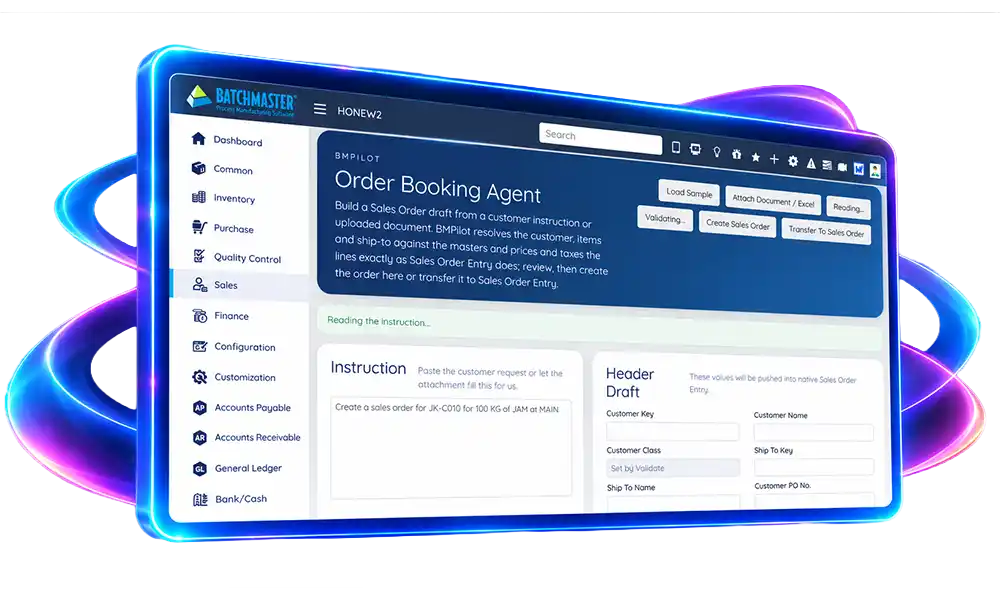
BatchMaster Pilot is a set of AI assistants built into BatchMaster ERP. Paste a purchase order, forward an enquiry, or type a sentence, and it fills in the screen you would have keyed by hand.

Order bookingReading

CustomerHARBOUR01 Harbour Foods Pvt Ltd
Ship toPlant 2,
Customer POHF-4471
ItemFG-KTC-1000 KETCHUP 1KG
Quantity120.000 KG stock UOM
Unit price148.50 price matrix
Tax18%FL at line level item sub type
Target ship15 Oct 2026
Order total21,020.40 INR

Edit any field, then create. BatchMaster Pilot writes the order through Sales Order Entry, the same way the screen does.

The adoption gap

Grow the plant, not the paperwork

Every growing operation adds orders, batches and people. An ERP only pays back once all of those people use it well, and that is where most rollouts slow down.

The hurdle

Adoption is slow

The BatchMaster AI difference

There is no screen path to learn first. People type a question or paste an email and get a useful result straight away.

The result

Value shows up sooner, because teams start using the ERP on day one.

The hurdle

Training takes time and money

The BatchMaster AI difference

People already know how to ask a question and describe what they need. There is far less to teach.

The result

Shorter onboarding, lower training cost and less time away from the job.

The hurdle

Teams resist new tools

The BatchMaster AI difference

Work in your own words, from a customer email, or from ChatGPT if your team already uses it.

The result

Willing adoption, because the tool feels familiar rather than imposed.

What it does

Three assistants, in the screens your team already uses

Each one starts from ordinary language and ends in a BatchMaster document you can see before it is saved.

01

SALES

Turns a customer’s own words into a sales order. Reads a pasted email, an attached PDF or Word order, or a spreadsheet of line items.
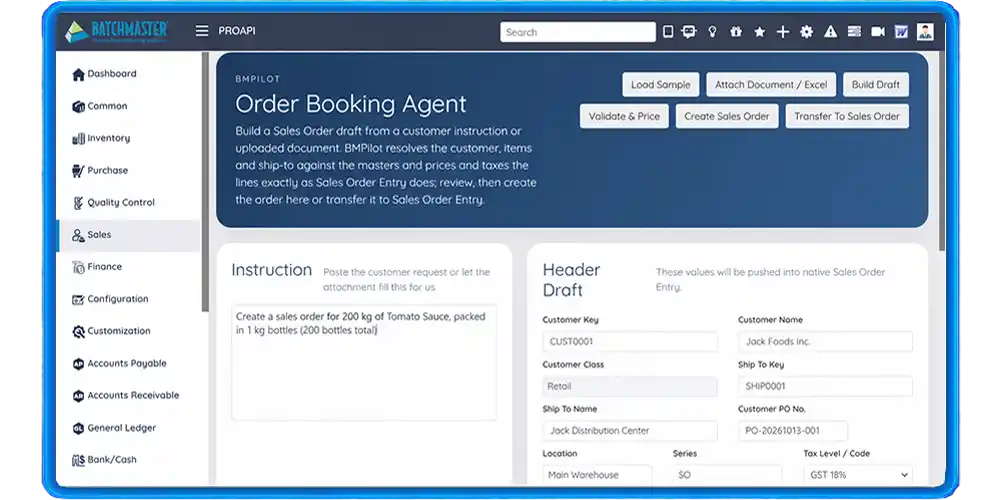
Order Booking

Order Booking

  • ✓ Resolves customer, ship-to and items against the masters
  • ✓ Prices through the ERP, including price lists and matrices
  • ✓ Flags a customer PO number already booked
  • ✓ Warns when an item is deactivated at that location
02

ANALYSIS

Answers questions about your data in plain English, and shows the figures as a table, a chart or a pivot you can take into Excel.
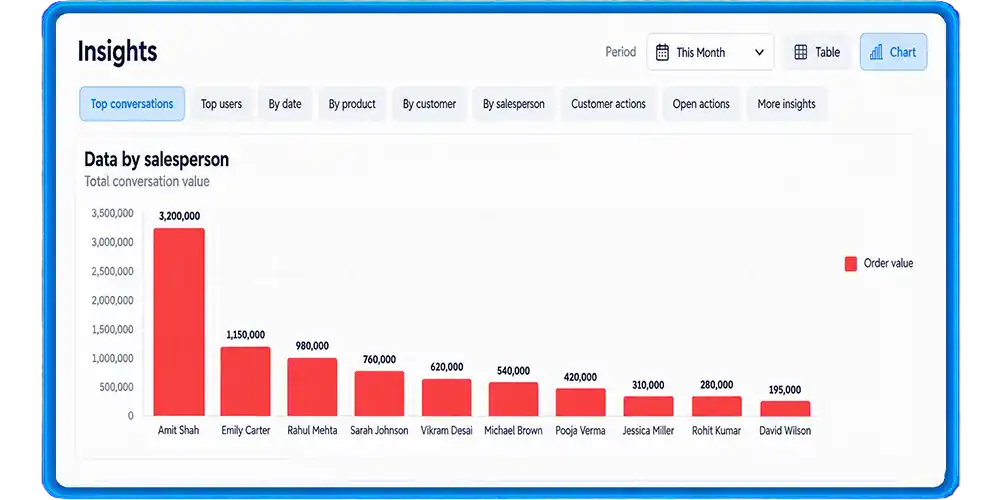
Insight

Insight

  • ✓ Sales, purchasing, inventory, production and QC
  • ✓ Follow-up questions keep the thread
  • ✓ Says when nothing matched instead of showing a zero
03

CRM

Takes an enquiry and drafts the opportunity: the prospect, the products they asked about, quantities, prices, the salesperson and the territory.
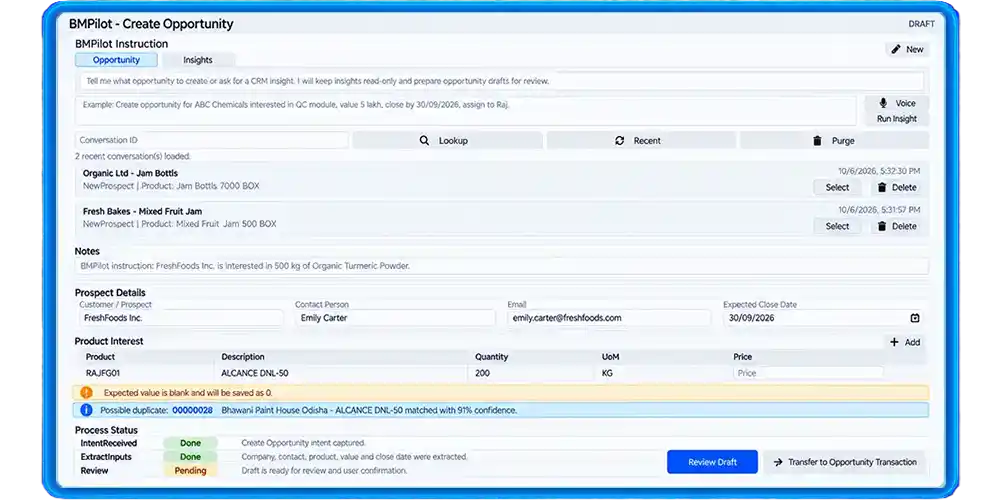
Opportunity

Opportunity

  • ✓ Recognises an existing customer or raises a new prospect
  • ✓ Keeps the enquiry's own wording on the record
  • ✓ Hands over to quotation when the deal moves
Order Booking

Order Booking

  • ✓ Resolves customer, ship-to and items against the masters
  • ✓ Prices through the ERP, including price lists and matrices
  • ✓ Flags a customer PO number already booked
  • ✓ Warns when an item is deactivated at that location

What it does

Three assistants, in the screens your team already uses

Each one starts from ordinary language and ends in a BME document you can see before it is saved.

SALES

Order Booking

Turns a customer’s own words into a sales order. Reads a pasted email, an attached PDF or Word order, or a spreadsheet of line items.

ANALYSIS

Insight

Answers questions about your data in plain English, and shows the figures as a table, a chart or a pivot you can take into Excel.

CRM

Opportunity

Takes an enquiry and drafts the opportunity: the prospect, the products they asked about, quantities, prices, the salesperson and the territory.

How it works

It asks the ERP, rather than guessing

An assistant that invents its own prices and taxes will disagree with your books on the first order. BatchMaster Pilot calls the routines BatchMaster already uses, so a draft and a hand-keyed document come out the same.

Details Pulled from Default Setups

Pricing, discounts, tax codes, revenue, and inventory accounts are automatically picked from predefined BME configurations. The AI uses only the values already defined in the system rather than assuming or generating its own, preventing mismatches.

Your Permissions

BatchMaster Pilot runs as the signed-in user, in their company, with their rights. It can see and do only what that person could do by hand.

Insight

Ask the question you would have asked a report writer

Insight understands your ERP’s structure, so a question can cross from a formula to the batches that used it, or from a customer to what is still open on their orders.

01

Which batches use formula CS-1200?

02

How much ketchup is planned to be produced today?

03

How many sales orders are due to ship on 22 October?

04

Invoice total for HARBOUR01 excluding taxes

05

Top 10 customers by invoice value this year, as a pie chart

06

Which items have stock on hand but no orders this year?

Questions are answered from a governed set of datasets. Each one carries the meaning of its own figures, so a quantity issued is never confused with a quantity planned, and a total before tax is never reported as one after.

MCP SERVER

BatchMaster, available to the assistant your team already uses

BatchMaster Pilot publishes a Model Context Protocol server. Connect Claude, ChatGPT or any other MCP client to it and your people can draft and confirm BatchMaster documents without leaving the window they work in.

Your Login, Not a Shared Key

Sign-in is a BatchMaster login over OAuth 2.1, The assistant acts as that user, in that company, with their rights.

Reading and Writing are Separate

Drafting and lookup change nothing. Creating a document is a distinct step the person has to confirm, so an assistant cannot book an order on its own.

Dedicated Server for Each Deployment

Each BatchMaster installation operates through its own dedicated server, protected by your organisation’s firewall and security certificate.

Tool
What it does
Confirmation
draft_sales_order
Reads an instruction and returns the order it would book, every field resolved and priced.
Not needed
create_sales_order
Books the reviewed draft in BME and returns the order number.
✓ Required
draft_opportunity
Turns an enquiry into a CRM opportunity with its product interests.
Not needed
lookup
Finds a customer, item or order without changing anything.
Not needed

Trust

Built into your ERP, not bolted on beside it

Native to the application

AI is embedded in BatchMaster, so intelligence sits where your team already works.

Nothing new to learn

Plain language replaces menu paths, so people start quickly and training stays light.

Work directly from ChatGPT

Use AI tool (like chatgpt, claude, etc.) on its own and reach BatchMaster through the connector, for data, reports and drafts, without opening the ERP first.

Data handling, explained

Your BatchMaster representative can walk you through access and data handling for your deployment.

Getting Started

See it draft one of your own orders

BatchMaster Pilot installs with BatchMaster Web 9.0 and needs your AI model credentials in Default Setup. Bring a real purchase order to the demonstration and we will book it.